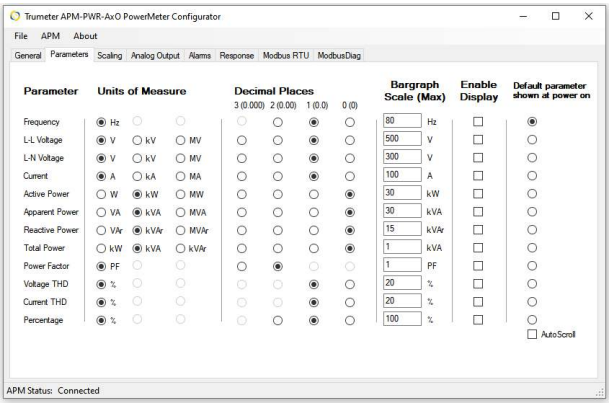
| Setting | Function |
|---|---|
| Parameters | Frequency, L-L Voltage, L-N Voltag, Current, Active Power, Reactive Power, Total Power, Voltage THD, Current THD, Percentage |
| Units of Measure | Select the unit of measure for the specified parameter. |
| Decimal Places | You can select up to 3 decimals for each parameter that you want to view. |
| Display Intensity | Set the display brightness when operating under normal conditions and during a preset Alarm condition. |
| Bargraph Scale (MAX) | Enter the maximum value that you want to display for the specific parameter. |
| Enable Display | Check the box of the parameters that you wish to view on the display. |
| Default parameter shown at power on |
Check the circle to show the default parameter you wish to view when power is applied. Auto Scroll: If you check this box, the meter will scroll through the parameters selected in the Enable Display section every 5 seconds. |