A checksum error occurs when the device detects corruption in the stored EEPROM memory data. This memory stores programming details and operating data.
During power-down, the unit saves data to EEPROM and calculates a checksum value. When the unit powers back on, it compares the stored checksum to a newly calculated value. If the values do not match, the unit displays an EEPROM checksum error message.
Common causes include:
- Electrical noise or voltage spikes on the power supply
- Power interruptions during memory writes
- A genuine processor or EEPROM fault
In some installations, adding a mains filter can help reduce electrical noise and prevent checksum errors.
How to Perform a Power-Up Reset
- Switch off power to the unit.
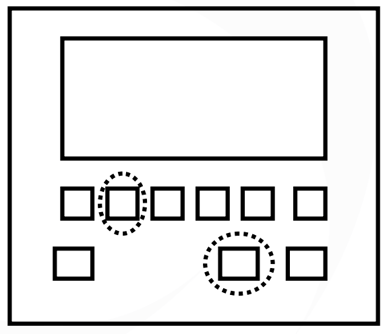
- Press and hold the PROG key and the Digit 1 key simultaneously.
- While holding both keys, switch the power back on.
- Continue holding both keys for approximately 10 seconds.
- The memory should now reset to the factory default settings.
- Reprogram the unit with the required custom configuration.